
Before you request quotes for a new office in Pakistan, put your ELV and ICT Requirements into a room-by-room schedule. For every item, name who supplies it, who installs and configures it, and what your team will check before accepting it. Confirm the landlord’s scope and the internet provider’s entry route before finalising ceilings, partitions and joinery.
Bring IT, facilities, the fit-out designer and the landlord together around the same floor plan. Record the move-in date, opening headcount, room uses and any areas expected to expand. Extra-low voltage (ELV) and information and communications technology (ICT) packages often share rooms and pathways, so ask bidders to state how they divide the work.
Give each room and door a reference that matches the drawing. Mark existing equipment that the business plans to reuse and name the person who will confirm its condition and compatibility. Ask IT to identify the connections needed for opening day, then record later additions with a target phase. This lets bidders price the same initial scope and explain what they have allowed for growth.
For workstations, specify how staff will connect and which shared devices need dedicated outlets. Scope office structured cabling by location, endpoint and the testing evidence IT expects. Include reception equipment, printers and audiovisual devices in the count. Ask the designer to show which outlets sit in floor boxes, walls or furniture.
Base Wi-Fi coverage planning on the intended use of each area, the partition layout and expected occupancy. Ask the contractor to explain how they will verify coverage after the fit-out. Agree the rooms, expected users and acceptance criteria with IT before tender so quotations can include the same verification work.
Record office access control by door, including who will administer credentials and what behaviour must be demonstrated at handover. Coordinate any interaction with emergency egress through the responsible designers. For CCTV, agree the purpose of each view and who will manage access to recordings. Give bidders the same coverage brief and ask them to identify any views they have excluded.
Ask the landlord to confirm approved risers, entry points, shared pathways and access arrangements. Put internet service provider coordination on the programme with a named lead, a target activation date and the handoff point between provider and tenant equipment. Confirm what access the provider needs for its survey and installation, and allow time to resolve any outstanding landlord permissions.
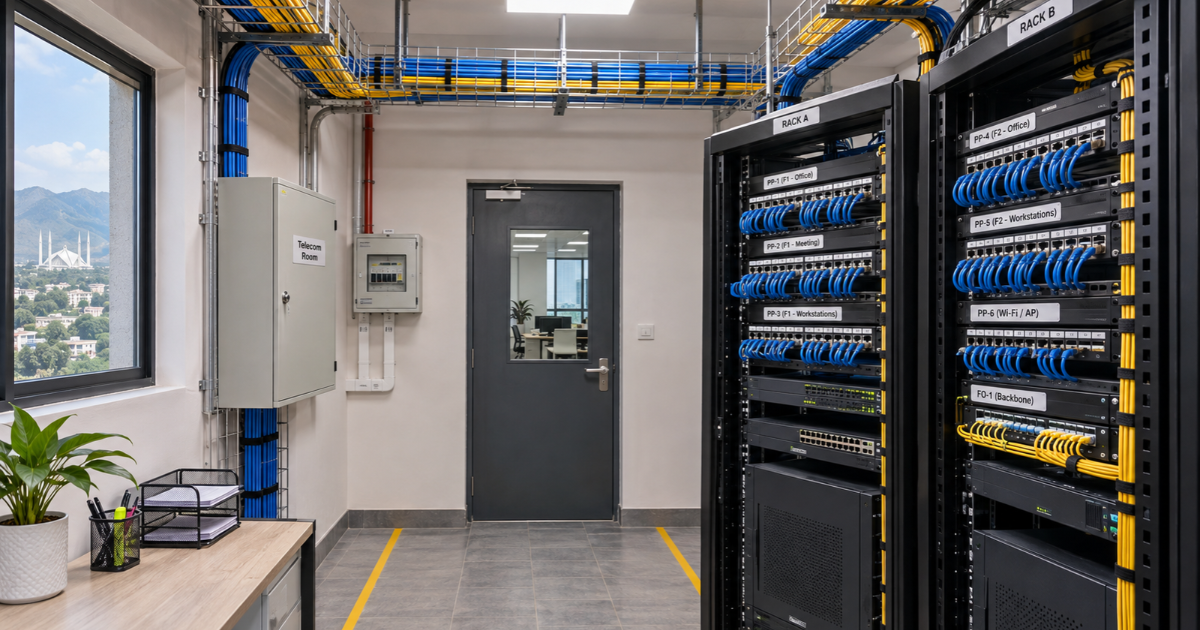
Set telecom room requirements before allocating storage or joinery. Review rack dimensions, service access, power, backup power where required, and cooling with the design team. Ask the electrical and ICT contractors to agree where their work meets. Include who supplies rack power connections and who confirms equipment loads before installation.
Walk the proposed cable routes against the reflected ceiling plan and coordinated services drawings. Review routes through walls and shared areas with the landlord and relevant design leads. Record the pathway and any penetration details the fit-out team needs before closing the ceiling. For the utility interface, have the team confirm applicable provider requirements and the scope of the Pakistan Electric and Telecommunication Safety Code.
Issue the same floor plan revision, room schedule and acceptance criteria to each bidder. Ask for a price breakdown by system and for the proposed equipment, quantities and exclusions to be stated alongside each price. If a quantity is provisional, ask how the final count will be measured and priced.
Check that each quote assigns supply, installation, configuration and testing separately. For instance, one bidder may include outlets and patch panels while expecting IT to provide switches and patch leads. Another may price the active equipment but exclude setup and licences. Ask each bidder to identify these boundaries so you can compare the cost of reaching the same working outcome.
Review recurring costs separately from installation costs. Ask who owns licences and support accounts, what term is included and when renewals start. Have the landlord, provider and internal IT team confirm any tasks assigned to them before issuing an order.
Start with the business requirement. Staff should be able to join a call with remote participants, share content and be heard from the intended seating positions. Add this outcome to the ELV and ICT Requirements and agree which conferencing platform and equipment the room will use.
Ask the audiovisual and ICT leads to confirm wired connection points for the selected equipment and the expected Wi-Fi use for participants. Have the fit-out designer coordinate display mounting, table connections and accessible cable routes with the selected furniture. Require the bidder to identify who supplies and configures the room equipment and who provides the platform account.
Agree a live call demonstration using the chosen platform and a remote participant. Ask IT to check join, content sharing and audio from the agreed seating positions. Record any outstanding items against the room reference and assign a date for the repeat demonstration.
| Room / System | Requirement | Supply / Install | Quote / Open Decision | Acceptance Evidence |
|---|---|---|---|---|
| MR-01 · 12 seats | Video calls and content sharing | AV contractor supplies and configures. ICT contractor provides links. IT supplies account. | Include AV setup and outlet tests. Confirm platform and furniture before order. | Outlet reports and live remote call from agreed seats. |
| Work Area | Enter endpoints and service | Assign supplier and installer | Confirm quantity and inclusions | Match test results to labels |
| Reception / Doors | Enter controlled doors and views | Assign installer and operator | Confirm landlord interface | Witness agreed scenarios |
| Telecom Room | Enter rack, power and cooling scope | Assign IT and fit-out trades | Confirm provider handoff | Inspect access and reconcile schedules |
Agree ELV testing and handover evidence in the tender. Ask for cable test reports matched to outlet identifiers, updated drawings and rack schedules. For Wi-Fi, ask for results measured against the agreed coverage criteria. For access control and CCTV, agree the demonstration scenarios, the people who will witness them and who will sign off each item.
Give IT an equipment and licence inventory, support contacts and a secure transfer of administrator access. Record who will own support after handover. Keep open issues visible by room or system, with a responsible party and a date for the follow-up test. Use Podium’s MEP Design Deliverables Checklist for Commercial Buildings in Pakistan to align these records with the wider design package.
Share your floor plan, room list, move-in date and open scope decisions with Podium Associates. Its ELV & ICT Systems service covers structured cabling, surveillance, access control and communications. Ask which deliverables and demonstrations can be included in your project scope.
Find quick answers about our manufacturing processes, project timelines, and service capabilities.
Count the endpoints that require wired connections in each room, including shared devices and meeting equipment. Have IT confirm which endpoints will use wireless connections and where to allow capacity for later additions. Use the agreed endpoint list to brief every bidder.
Ask for written confirmation of approved pathways, shared riser access, any restrictions on penetrations and the boundary between landlord and tenant work. Give bidders the relevant requirements with the tender package.
Contact the provider while the layout and entry route are still under review. Ask for the survey requirements, installation dependencies and target activation date, then track these alongside the fit-out milestones. Schedule service verification before staff move in.
IT can supply them directly or include them in the contractor’s scope. State the agreed route in the tender, with responsibility for configuration, warranty, licences and support. Confirm when the selected devices need to be available for installation and testing.
Check for excluded active equipment, software licences, patch leads, pathway work, configuration and test reports. Ask bidders to identify the cost of completing excluded items or record who will cover them separately.
Ask for test reports, installed drawings, outlet and rack schedules, equipment inventory, support details and secure administrator access. Have IT verify the records against the installed systems and track any open issues to closure.